What Is the Daily Limit for Venmo? A Complete Guide to Payment and Transfer Limits
What Is the Daily Limit for Venmo?

Introduction
What is the daily limit for Venmo? This is a common question among people who use digital payment services to send money to friends, pay for purchases, or transfer funds to their bank accounts. Venmo is a popular payment platform in the United States that allows users to send and receive money through a mobile app. However, the amount users can send or transfer depends on several factors, including account verification, transaction type, and individual account limits.
One important detail is that Venmo generally uses rolling weekly limits for personal payments and bank transfers rather than one universal daily sending limit. Some services, including the Venmo debit card, have specific daily limits. Understanding these differences can help users manage transactions more effectively.
Does Venmo Have a Daily Sending Limit?
Venmo does not publish one universal daily limit that applies to every personal payment. Instead, personal payment allowances generally depend on the account’s verification status and the type of transaction.
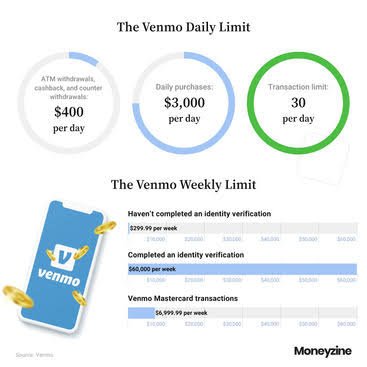
According to Venmo’s published guidance, an unverified personal profile has a weekly spending limit of $299.99, while a verified personal profile can send up to $60,000 per rolling week. These amounts are subject to Venmo’s terms, account-specific restrictions, and changes to its policies.
Because the limits are weekly, the amount a person can send on a particular day depends on how much of the available allowance has already been used. A user should check their account before making a large payment rather than assuming a particular amount is available every day.
How Identity Verification Affects Venmo Limits
Identity verification is an important part of using Venmo. It helps the platform confirm a user’s identity and may unlock additional account features and higher transaction limits.
Without identity verification, users can face lower limits on payments and transfers. Once verification is completed successfully, eligible accounts may receive higher allowances.
Users can generally begin the verification process by following these steps:
- Open the Venmo mobile app.
- Navigate to the Me tab.
- Select the Settings icon.
- Choose Identity Verification.
- Follow the instructions displayed in the app.
Venmo may request additional information or documentation if it cannot verify the information automatically. Users should provide accurate information and follow the official process.
Identity verification does not guarantee that every transaction will be approved. Venmo may still review or decline payments for security, account, or other reasons.
Venmo Daily Limits for Bank Transfers
Sending money to another Venmo user is different from transferring money from Venmo to a bank account. Bank transfers have their own limits.
According to Venmo’s published personal-profile bank transfer guidance, users who have not completed identity verification can transfer up to $999.99 to their bank per rolling week.
For verified personal profiles, the published limits include:
- Maximum per individual transfer: $5,000.
- Maximum per rolling week: $19,999.99.
These figures apply to eligible personal profiles and may change. A user who needs to transfer a larger balance may need to make multiple transfers within the applicable limits.
Venmo offers standard and instant transfer options. Standard transfers are generally free and typically take one to three business days. Instant transfers usually arrive much faster when the destination is eligible, but fees may apply.
The availability of a transfer option and its final processing time can depend on the receiving bank, debit card, and Venmo’s review procedures.
What Is the Venmo Debit Card Daily Limit?
The Venmo debit card has separate daily limits that are different from personal payment and bank transfer allowances.
Venmo’s published debit card guidance lists the following limits:
| Transaction type | Published daily limit |
| Debit card purchases | $3,000 |
| ATM withdrawals, over-the-counter withdrawals, and cash back combined | $1,000 |
| Number of debit card transactions | 30 per day |
These limits reset at midnight Central Time, according to Venmo’s guidance. Individual account restrictions and other transaction conditions may still apply.
For example, a user who has already reached the debit card’s daily purchase limit may be unable to make another purchase with that card until the limit resets. This does not necessarily mean that the person’s Venmo person-to-person payment allowance has also been exhausted.
Users should consult Venmo’s official debit card information for the latest rules that apply to their card.
Understanding Venmo’s Rolling Weekly Limits
A rolling weekly limit is different from a limit that resets every Monday or at the beginning of a new calendar week.
With a rolling limit, each transaction counts against the applicable allowance for seven days from the time it was authorized. Once that period has passed, the transaction stops counting toward the limit.
For example, imagine that a payment is authorized on Monday at 11:00 a.m. That payment may stop counting against the rolling weekly allowance at approximately 11:00 a.m. the following Monday, subject to the platform’s transaction records.
This system means that the available amount can change throughout the week. Users should review their recent activity before planning a large payment or bank transfer.
Why Might Venmo Decline a Payment?
A payment can be declined even when a user believes they are below the applicable limit. Transaction limits are only one factor in Venmo’s approval process.
Other possible reasons include:
- Insufficient funds in the selected payment method.
- Incorrect or outdated bank or card information.
- Account security checks or unusual transaction activity.
- Restrictions associated with the account or payment method.
- Temporary technical problems.
- Additional verification requirements.
If a transaction fails, users should read the message displayed in the app and review their payment method and account status. If the reason remains unclear, contacting Venmo Support through official channels is the safest next step.
Repeatedly attempting the same declined payment may not solve the issue. It is better to identify the reason before trying again.
How to Check Your Venmo Limits
The easiest way to understand your available payment options is to review your account and Venmo’s official help resources.
Users should check their identity verification status, recent transactions, linked payment methods, and any notifications about account restrictions.
Venmo’s Help Center provides separate information for personal payment limits, bank transfers, debit card transactions, and other account features. These distinctions matter because the limit for sending money is not necessarily the same as the limit for withdrawing it.
For current details, visit the official Venmo Help Center and review the relevant limit information before making a large transaction.
Tips for Managing Venmo Transactions
A few simple habits can help users avoid confusion when using Venmo.
First, confirm the recipient’s username and payment details before sending money. Digital payments can be difficult to reverse once completed.
Second, keep track of recent transactions so you understand how much of your rolling weekly allowance may remain.
Third, verify your identity through the official app when required. Never share passwords, verification codes, or sensitive account information with someone claiming they can increase your limit.
Finally, remember that Venmo can change its limits and apply account-specific restrictions. Information found in an older online article may not reflect the rules that currently apply to your account.
Frequently Asked Questions
1. What is the daily limit for Venmo?
Venmo does not publish one universal daily sending limit for personal payments. Personal payment allowances generally use rolling weekly limits, while specific services such as the debit card have separate daily limits.
2. Does verifying my identity increase my Venmo limit?
Identity verification can provide access to higher limits and additional account features. The limit that applies depends on the transaction type and the account’s eligibility.
3. How much can I transfer from Venmo to my bank?
Venmo’s published limits for personal profiles include up to $999.99 per rolling week for unverified users and up to $19,999.99 per rolling week for verified users, with a $5,000 maximum per individual transfer for verified users.
4. When does my Venmo weekly limit reset?
Most relevant limits are rolling weekly limits rather than fixed calendar-week allowances. Each transaction generally stops counting against the limit seven days after authorization.
5. Can Venmo decline a payment below my limit?
Yes. Payments may be declined for security checks, funding problems, account restrictions, or other reasons unrelated to the published limit.
Conclusion
Understanding what is the daily limit for Venmo requires looking beyond a single number. Personal payments, bank transfers, and debit card transactions have different rules, and identity verification can affect the available allowance.
Venmo generally uses rolling weekly limits for personal payments and bank transfers, while its debit card has specific daily spending and withdrawal limits. Since limits and account restrictions can change, users should consult the official Venmo Help Center and their account information before making a large transaction.
By understanding the difference between daily and rolling weekly limits, users can plan payments more carefully, avoid unnecessary confusion, and use the platform responsibly.
Long-Tail Keywords
- what is the daily limit for venmo
- Venmo daily sending limit
- Venmo weekly payment limit
- Venmo bank transfer limit
- Venmo debit card daily limit
- Venmo identity verification limits
- Venmo payment declined
- Venmo rolling weekly limits
You May Also Read
